
Setup Guide
You need a Paper, Folia or Purpur server on Minecraft 1.21.10 to 26.3 with Java 21 or newer, and Minecraft 1.21.11 or newer on your own computer. When a step does not work, Troubleshooting has the fix.
1. Install
- Stop the server.
- Put the Reticle jar into the
pluginsfolder. - Start the server.
Reticle creates plugins/Reticle/ with settings.yml and two example menus, main.yml and shop.yml. The pack and the editor travel over your Minecraft port, so you open no other port.
Behind BungeeCord or Velocity
Players connect to the proxy, which cannot hand out the pack or the editor. On each backend server, write a free port and this machine's public address into plugins/Reticle/settings.yml, open that port in your firewall and type reticle reload in the console:
Web:
  Host: play.example.com
  Port: 8164
  Bind: 0.0.0.0
Every server on the same machine needs a port of its own. Behind BungeeCord or Velocity explains why.
2. Join and take the pack
- Type
op YourNamein the server console, with your own name. - Join the server with Minecraft 1.21.11 or newer.
- Minecraft asks whether you want the server's pack: "Menus on this server look and feel best with this small pack." Click Yes.
3. Open your first menu
- Type
/reticle open main. The example menu opens in front of you.
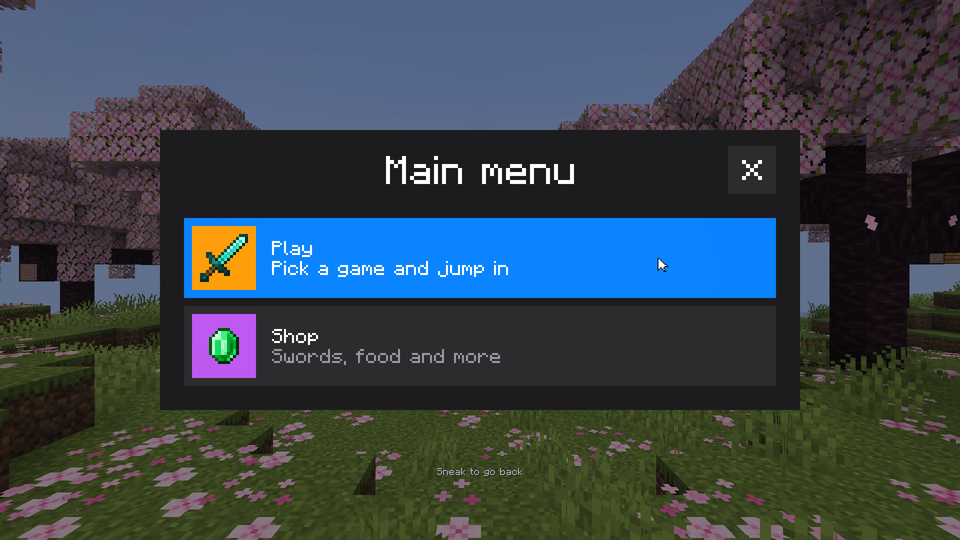
- Move the mouse. The pointer moves over the menu, and the button under it turns blue.
- Point at Shop and click. The shop opens.
- Click Diamond sword. You get one, and the chat says so.

- Sneak to go back to the main menu.
- Sneak again, or click the × in the top right corner, to close it.
While a menu is open you sit still and cannot walk. Damage, a teleport or /reticle reload closes it.
4. Make a menu in the editor
- Type
/reticle editor. - Click "Open the menu editor" in chat. The editor opens in your browser.
- Click New next to Menus.
- Click Warps, then Create.

Reticle saves the menu as menus/warps.yml, and it works at once.
- Click Show in game. The Warps menu opens in front of you.
- Click an empty spot of the preview. The panel on the right shows the menu's settings.
- Type
warpmenuinto Commands. - Click Save. Every player can now open the menu with
/warpmenu.
The Warps buttons run /spawn, /warp market and /warp arena, which need a plugin that has those commands. Click a button in the preview, change its actions to commands your server has and click Save. Players who have the menu open see the change at once.
5. Show a HUD
- In the editor, click New next to HUDs.
- Click Quest, then Create. The quest panel appears in the top left corner of your screen.
- Click a line of its text in the preview and write your own in the panel on the right.
- Click an empty spot of the preview and write the same quest into Fallback. Players without the pack see that line as a boss bar.
- Click Save.
Every player sees the HUD from the moment he joins. With all four HUD templates in use, the screen looks like this:
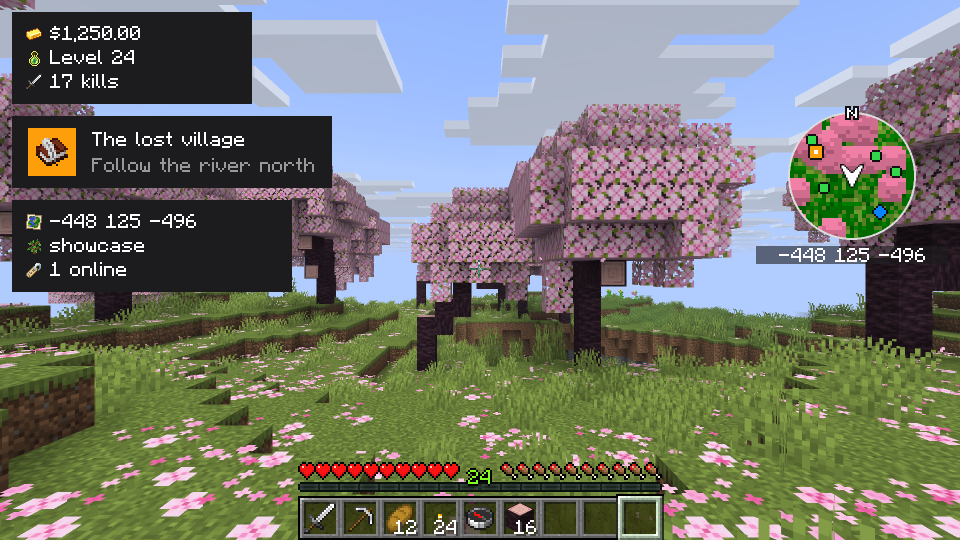
Stats and Coordinates read their values from PlaceholderAPI and need it with the expansions listed under Templates. Quest and Minimap need nothing else.
6. Show the minimap
- Click New next to HUDs again.
- Click Minimap, then Create. A round map of the land around you appears in the top right corner.
- Type
/reticle map waypoint add home bluein the game. - Walk a few steps. A blue diamond marks the spot.
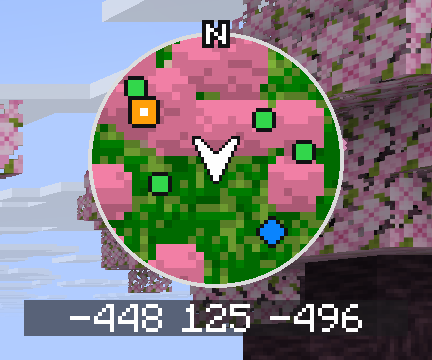
The arrow is you and points where you look, and N marks north. Green dots are animals, the orange square is a pin and the blue diamond is a waypoint. The line below the map shows the block you stand on.
Every player zooms his own minimap with /reticle map zoom in and /reticle map zoom out. Maps lists the other things he can change.
7. What each player sees
Reticle picks how to draw a menu for each player when it opens:
| His game | What he sees |
|---|---|
| 1.21.11 or newer, with the pack | The menu flat on his screen as in step 3, and every HUD |
| 1.21.9 or 1.21.10, or newer without the pack | The menu standing in front of him |
| Older than 1.21.9 | A chest with the same buttons |
Without the pack
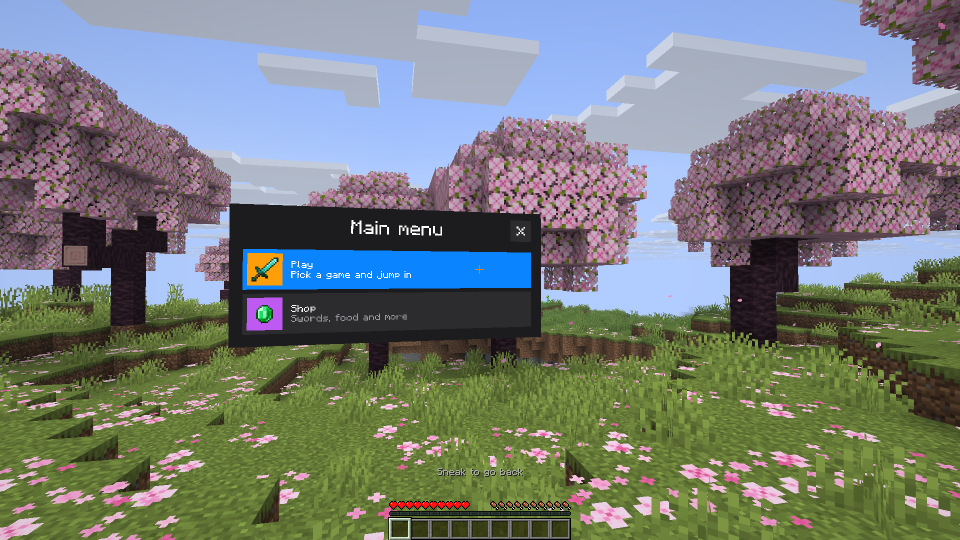
The menu stands a quarter of a block in front of his eyes, and his crosshair is the pointer. Every button works the same.
- A HUD shows its
Fallbackline as a boss bar at the top of his screen, or nothing when it has none. - The minimap lends him a vanilla map in his empty off hand.
- A world map in a menu shows one gray line in its place: "The map needs this server's resource pack".
A player who said no can still take the pack. He edits your server in his server list, sets Server Resource Packs to Enabled and joins again.
On a game older than 1.21.9
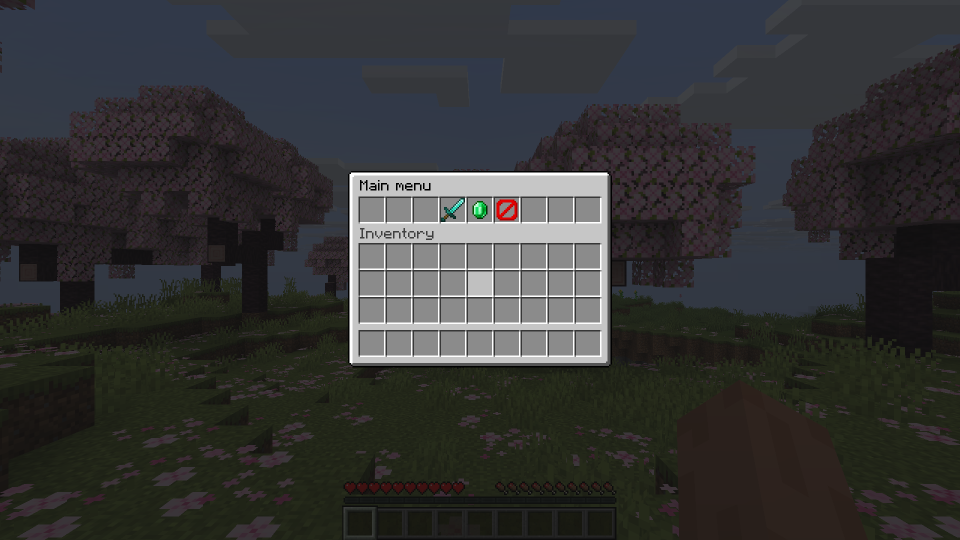
He joins through ViaVersion and ViaBackwards and gets a chest. Each button becomes an item named after its text, and a click runs the same actions. HUDs show only their Fallback line, and the chest leaves maps out.