
Groups
You can group players by certain permission and have ChatControl treat them differently. Such as VIP players can type faster in the chat, etc.
Configuring Groups
Open settings.yml and see "Groups" section. You can place, edit or remove all subsections at your will. Each subsection is a group with its options, such as the "admin" group has no message delay below:
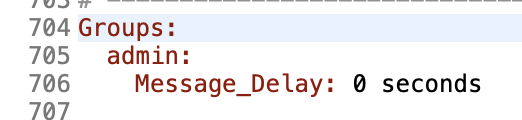
You apply this group by giving players "chatcontrol.group.{groupName}" permission, in this case "chatcontrol.group.admin".
Group Options
ChatControl offers several group options to customize how different player groups interact with the chat system:
| Option | Description | Example Value |
|---|---|---|
| Max_Read_Channels | Maximum number of channels a player can read simultaneously | 3 |
| Message_Delay | Time delay required between chat messages for this group | "2 seconds" |
| Message_Similarity | Minimum allowed difference between consecutive messages (prevents spam) | "50%" |
| Command_Delay | Time delay required between commands for this group | "3 seconds" |
| Command_Similarity | Minimum allowed difference between consecutive commands | "50%" |
| Sound_Notify_Format | Color for Sound Notify when tagging other players | "&6" (gold) |
| Format_Motd | Name of the format that displays the message of the day when player joins | "vip_motd" |
Common Group Setups
Below are some example group configurations for different player types:
VIP Players Configuration
Groups:
  vip:
    Message_Delay: "1 second"
    Command_Delay: "1 second"
    Max_Read_Channels: 3
    Sound_Notify_Format: "&6"
    Format_Motd: "vip_motd"
Permission: chatcontrol.group.vip
Staff Configuration
Groups:
  staff:
    Message_Delay: "0 seconds"
    Command_Delay: "0 seconds"
    Max_Read_Channels: 5
    Sound_Notify_Format: "&c"
    Format_Motd: "staff_motd"
Permission: chatcontrol.group.staff